Code
# rode isso apenas se voce estiver no colab!
# git clone https://github.com/ftl-brazil-2026/ebook.git
# pip install -r requirements.txtNesta aula vamos colocar em prática o que aprendemos sobre STAC para investigar um evento real. O rompimento da barragem de rejeitos da Vale em Brumadinho (MG), ocorrido em 25 de janeiro de 2019.
Nosso fluxo de trabalho será: - Buscar imagens CBERS-4/MUX de antes e depois do rompimento; - Calcular índices espectrais (NDVI, NDWI e EVI); - Analisar o histograma desses índices; - Classificar a imagem por limiares (thresholding); - Calcular a diferença entre as duas datas para visualizar o impacto do desastre.
Link Colab

# rode isso apenas se voce estiver no colab!
# git clone https://github.com/ftl-brazil-2026/ebook.git
# pip install -r requirements.txtfrom pystac_client import Client
import rasterio
from rasterio.windows import from_bounds
from pyproj import Transformer
import numpy as np
import matplotlib.pyplot as plt
from matplotlib.colors import ListedColormap
import seaborn as sns
import psutildef check_memory(label: str = "", warn_threshold: float = 85.0) -> None:
"""Imprime o uso atual de RAM e alerta se estiver perto do limite da máquina."""
mem = psutil.virtual_memory()
used_gb = mem.used / (1024 ** 3)
total_gb = mem.total / (1024 ** 3)
available_gb = mem.available / (1024 ** 3)
prefix = f"[RAM] {label}: " if label else "[RAM] "
print(f"{prefix}{used_gb:.2f} GB usados de {total_gb:.2f} GB ({mem.percent:.1f}%) | disponível: {available_gb:.2f} GB")
if mem.percent >= warn_threshold:
print(f"ATENÇÃO: uso de RAM acima de {warn_threshold:.0f}%! Considere reiniciar o kernel "
"ou reduzir a área de interesse (bbox/window).")
check_memory()[RAM] 15.60 GB usados de 32.00 GB (58.2%) | disponível: 13.39 GBNa aula passada utilizamos os dados do CBERS4, nessa aula vamos utilizar os dados de sentinel-2 para ter acesso as bandas SWIR. Vamos buscar cenas sobre a região da barragem, tanto antes quanto depois de 25/01/2019.
Área de interesse: entorno da mina Córrego do Feijão / Brumadinho-MG.
Caso voce queira cobrir uma outra área de interesse, pode usar esse link aqui para definir a bbox facilmente: bbox finder
Para baixar as imagens do Sentinel-2, é preciso gerar as API keys. Siga esse link aqui para mais informações: API - CDSE.
Se você já tem uma conta, só precisa acessar esse link: CDSE-API-KEYS-GENERATION, depois gerar uma nova chave API, cole tanto a sua Acess Key como Secret Key dentro do .env, como indicado em nosso .env_copy.
import os
from dotenv import load_dotenv
load_dotenv()True#os.environ["GDAL_HTTP_TCP_KEEPALIVE"] = "YES"
os.environ["AWS_S3_ENDPOINT"] = "eodata.dataspace.copernicus.eu"
os.environ["AWS_ACCESS_KEY_ID"] = os.environ.get("CDSE_CLIENT")
os.environ["AWS_SECRET_ACCESS_KEY"] = os.environ.get("CDSE_SECRET")
os.environ["AWS_HTTPS"] = "YES"
os.environ["AWS_VIRTUAL_HOSTING"] = "FALSE"
# endpoint da AWS pro ecossistema copernicus no STAC
cdse_stac = "https://stac.dataspace.copernicus.eu/v1/"
client = Client.open(cdse_stac)list(client.get_all_collections())# bbox aproximado cobrindo a barragem de Brumadinho / Córrego do Feijão
# lembrando que nosso bbox ta em WGS84 - EPSG4326 (classico de qualquer análise, mas não é um sistema projetado! )
bbox = [-44.142273, -20.144694, -44.103469, -20.110041]import folium
from shapely.geometry import box
bounds_polygon = box(*bbox)
centro_lat = (bbox[1] + bbox[3]) / 2
centro_lon = (bbox[0] + bbox[2]) / 2
m = folium.Map(location=[centro_lat, centro_lon], zoom_start=15)
folium.GeoJson(
bounds_polygon.__geo_interface__,
name="Bounds",
style_function=lambda x: {
'fillColor': 'none',
'color': 'blue',
'weight': 3,
'fillOpacity': 0
}
).add_to(m)
msearch_antes = client.search(
collections=["sentinel-2-l2a"],
bbox=bbox,
datetime="2018-10-01/2019-01-24",
query={"eo:cloud_cover": {"lt": 15}}
)
search_depois = client.search(
collections=["sentinel-2-l2a"],
bbox=bbox,
datetime="2019-01-26/2019-04-30",
query={"eo:cloud_cover": {"lt": 15}}
)
print("Imagens antes do rompimento:", search_antes.matched())
for item in search_antes.items():
print(" ", item.id, "- nuvens:", round(item.properties["eo:cloud_cover"], 1), "%")
print("\nImagens depois do rompimento:", search_depois.matched())
for item in search_depois.items():
print(" ", item.id, "- nuvens:", round(item.properties["eo:cloud_cover"], 1), "%")Imagens antes do rompimento: None
S2A_MSIL2A_20190122T131241_N0500_R138_T23KNT_20221210T105448 - nuvens: 2.2 %
S2B_MSIL2A_20190117T131239_N0500_R138_T23KNT_20221220T235155 - nuvens: 3.4 %
S2B_MSIL2A_20190107T131239_N0500_R138_T23KNT_20221216T195510 - nuvens: 0.8 %
Imagens depois do rompimento: None
S2B_MSIL2A_20190427T131249_N0500_R138_T23KNT_20221021T034403 - nuvens: 2.9 %
S2B_MSIL2A_20190308T131239_N0500_R138_T23KNT_20221114T091205 - nuvens: 5.1 %
S2A_MSIL2A_20190201T131241_N0500_R138_T23KNT_20221206T064832 - nuvens: 1.0 %Vamos escolher duas cenas da mesma órbita/tile (mesmo enquadramento), uma de cada período, com baixa cobertura de nuvens.
item_antes = list(list(search_antes.items()))[2]

item_depois = list(list(search_depois.items()))[1]

print(item_antes)
print(item_depois)
<Item id=S2B_MSIL2A_20190107T131239_N0500_R138_T23KNT_20221216T195510>
<Item id=S2B_MSIL2A_20190308T131239_N0500_R138_T23KNT_20221114T091205>item_antes.assets{'AOT_10m': <Asset href=s3://eodata/Sentinel-2/MSI/L2A_N0500/2019/01/07/S2B_MSIL2A_20190107T131239_N0500_R138_T23KNT_20221216T195510.SAFE/GRANULE/L2A_T23KNT_A009602_20190107T131241/IMG_DATA/R10m/T23KNT_20190107T131239_AOT_10m.jp2>,
'AOT_20m': <Asset href=s3://eodata/Sentinel-2/MSI/L2A_N0500/2019/01/07/S2B_MSIL2A_20190107T131239_N0500_R138_T23KNT_20221216T195510.SAFE/GRANULE/L2A_T23KNT_A009602_20190107T131241/IMG_DATA/R20m/T23KNT_20190107T131239_AOT_20m.jp2>,
'AOT_60m': <Asset href=s3://eodata/Sentinel-2/MSI/L2A_N0500/2019/01/07/S2B_MSIL2A_20190107T131239_N0500_R138_T23KNT_20221216T195510.SAFE/GRANULE/L2A_T23KNT_A009602_20190107T131241/IMG_DATA/R60m/T23KNT_20190107T131239_AOT_60m.jp2>,
'B01_20m': <Asset href=s3://eodata/Sentinel-2/MSI/L2A_N0500/2019/01/07/S2B_MSIL2A_20190107T131239_N0500_R138_T23KNT_20221216T195510.SAFE/GRANULE/L2A_T23KNT_A009602_20190107T131241/IMG_DATA/R20m/T23KNT_20190107T131239_B01_20m.jp2>,
'B01_60m': <Asset href=s3://eodata/Sentinel-2/MSI/L2A_N0500/2019/01/07/S2B_MSIL2A_20190107T131239_N0500_R138_T23KNT_20221216T195510.SAFE/GRANULE/L2A_T23KNT_A009602_20190107T131241/IMG_DATA/R60m/T23KNT_20190107T131239_B01_60m.jp2>,
'B02_10m': <Asset href=s3://eodata/Sentinel-2/MSI/L2A_N0500/2019/01/07/S2B_MSIL2A_20190107T131239_N0500_R138_T23KNT_20221216T195510.SAFE/GRANULE/L2A_T23KNT_A009602_20190107T131241/IMG_DATA/R10m/T23KNT_20190107T131239_B02_10m.jp2>,
'B02_20m': <Asset href=s3://eodata/Sentinel-2/MSI/L2A_N0500/2019/01/07/S2B_MSIL2A_20190107T131239_N0500_R138_T23KNT_20221216T195510.SAFE/GRANULE/L2A_T23KNT_A009602_20190107T131241/IMG_DATA/R20m/T23KNT_20190107T131239_B02_20m.jp2>,
'B02_60m': <Asset href=s3://eodata/Sentinel-2/MSI/L2A_N0500/2019/01/07/S2B_MSIL2A_20190107T131239_N0500_R138_T23KNT_20221216T195510.SAFE/GRANULE/L2A_T23KNT_A009602_20190107T131241/IMG_DATA/R60m/T23KNT_20190107T131239_B02_60m.jp2>,
'B03_10m': <Asset href=s3://eodata/Sentinel-2/MSI/L2A_N0500/2019/01/07/S2B_MSIL2A_20190107T131239_N0500_R138_T23KNT_20221216T195510.SAFE/GRANULE/L2A_T23KNT_A009602_20190107T131241/IMG_DATA/R10m/T23KNT_20190107T131239_B03_10m.jp2>,
'B03_20m': <Asset href=s3://eodata/Sentinel-2/MSI/L2A_N0500/2019/01/07/S2B_MSIL2A_20190107T131239_N0500_R138_T23KNT_20221216T195510.SAFE/GRANULE/L2A_T23KNT_A009602_20190107T131241/IMG_DATA/R20m/T23KNT_20190107T131239_B03_20m.jp2>,
'B03_60m': <Asset href=s3://eodata/Sentinel-2/MSI/L2A_N0500/2019/01/07/S2B_MSIL2A_20190107T131239_N0500_R138_T23KNT_20221216T195510.SAFE/GRANULE/L2A_T23KNT_A009602_20190107T131241/IMG_DATA/R60m/T23KNT_20190107T131239_B03_60m.jp2>,
'B04_10m': <Asset href=s3://eodata/Sentinel-2/MSI/L2A_N0500/2019/01/07/S2B_MSIL2A_20190107T131239_N0500_R138_T23KNT_20221216T195510.SAFE/GRANULE/L2A_T23KNT_A009602_20190107T131241/IMG_DATA/R10m/T23KNT_20190107T131239_B04_10m.jp2>,
'B04_20m': <Asset href=s3://eodata/Sentinel-2/MSI/L2A_N0500/2019/01/07/S2B_MSIL2A_20190107T131239_N0500_R138_T23KNT_20221216T195510.SAFE/GRANULE/L2A_T23KNT_A009602_20190107T131241/IMG_DATA/R20m/T23KNT_20190107T131239_B04_20m.jp2>,
'B04_60m': <Asset href=s3://eodata/Sentinel-2/MSI/L2A_N0500/2019/01/07/S2B_MSIL2A_20190107T131239_N0500_R138_T23KNT_20221216T195510.SAFE/GRANULE/L2A_T23KNT_A009602_20190107T131241/IMG_DATA/R60m/T23KNT_20190107T131239_B04_60m.jp2>,
'B05_20m': <Asset href=s3://eodata/Sentinel-2/MSI/L2A_N0500/2019/01/07/S2B_MSIL2A_20190107T131239_N0500_R138_T23KNT_20221216T195510.SAFE/GRANULE/L2A_T23KNT_A009602_20190107T131241/IMG_DATA/R20m/T23KNT_20190107T131239_B05_20m.jp2>,
'B05_60m': <Asset href=s3://eodata/Sentinel-2/MSI/L2A_N0500/2019/01/07/S2B_MSIL2A_20190107T131239_N0500_R138_T23KNT_20221216T195510.SAFE/GRANULE/L2A_T23KNT_A009602_20190107T131241/IMG_DATA/R60m/T23KNT_20190107T131239_B05_60m.jp2>,
'B06_20m': <Asset href=s3://eodata/Sentinel-2/MSI/L2A_N0500/2019/01/07/S2B_MSIL2A_20190107T131239_N0500_R138_T23KNT_20221216T195510.SAFE/GRANULE/L2A_T23KNT_A009602_20190107T131241/IMG_DATA/R20m/T23KNT_20190107T131239_B06_20m.jp2>,
'B06_60m': <Asset href=s3://eodata/Sentinel-2/MSI/L2A_N0500/2019/01/07/S2B_MSIL2A_20190107T131239_N0500_R138_T23KNT_20221216T195510.SAFE/GRANULE/L2A_T23KNT_A009602_20190107T131241/IMG_DATA/R60m/T23KNT_20190107T131239_B06_60m.jp2>,
'B07_20m': <Asset href=s3://eodata/Sentinel-2/MSI/L2A_N0500/2019/01/07/S2B_MSIL2A_20190107T131239_N0500_R138_T23KNT_20221216T195510.SAFE/GRANULE/L2A_T23KNT_A009602_20190107T131241/IMG_DATA/R20m/T23KNT_20190107T131239_B07_20m.jp2>,
'B07_60m': <Asset href=s3://eodata/Sentinel-2/MSI/L2A_N0500/2019/01/07/S2B_MSIL2A_20190107T131239_N0500_R138_T23KNT_20221216T195510.SAFE/GRANULE/L2A_T23KNT_A009602_20190107T131241/IMG_DATA/R60m/T23KNT_20190107T131239_B07_60m.jp2>,
'B08_10m': <Asset href=s3://eodata/Sentinel-2/MSI/L2A_N0500/2019/01/07/S2B_MSIL2A_20190107T131239_N0500_R138_T23KNT_20221216T195510.SAFE/GRANULE/L2A_T23KNT_A009602_20190107T131241/IMG_DATA/R10m/T23KNT_20190107T131239_B08_10m.jp2>,
'B09_60m': <Asset href=s3://eodata/Sentinel-2/MSI/L2A_N0500/2019/01/07/S2B_MSIL2A_20190107T131239_N0500_R138_T23KNT_20221216T195510.SAFE/GRANULE/L2A_T23KNT_A009602_20190107T131241/IMG_DATA/R60m/T23KNT_20190107T131239_B09_60m.jp2>,
'B11_20m': <Asset href=s3://eodata/Sentinel-2/MSI/L2A_N0500/2019/01/07/S2B_MSIL2A_20190107T131239_N0500_R138_T23KNT_20221216T195510.SAFE/GRANULE/L2A_T23KNT_A009602_20190107T131241/IMG_DATA/R20m/T23KNT_20190107T131239_B11_20m.jp2>,
'B11_60m': <Asset href=s3://eodata/Sentinel-2/MSI/L2A_N0500/2019/01/07/S2B_MSIL2A_20190107T131239_N0500_R138_T23KNT_20221216T195510.SAFE/GRANULE/L2A_T23KNT_A009602_20190107T131241/IMG_DATA/R60m/T23KNT_20190107T131239_B11_60m.jp2>,
'B12_20m': <Asset href=s3://eodata/Sentinel-2/MSI/L2A_N0500/2019/01/07/S2B_MSIL2A_20190107T131239_N0500_R138_T23KNT_20221216T195510.SAFE/GRANULE/L2A_T23KNT_A009602_20190107T131241/IMG_DATA/R20m/T23KNT_20190107T131239_B12_20m.jp2>,
'B12_60m': <Asset href=s3://eodata/Sentinel-2/MSI/L2A_N0500/2019/01/07/S2B_MSIL2A_20190107T131239_N0500_R138_T23KNT_20221216T195510.SAFE/GRANULE/L2A_T23KNT_A009602_20190107T131241/IMG_DATA/R60m/T23KNT_20190107T131239_B12_60m.jp2>,
'B8A_20m': <Asset href=s3://eodata/Sentinel-2/MSI/L2A_N0500/2019/01/07/S2B_MSIL2A_20190107T131239_N0500_R138_T23KNT_20221216T195510.SAFE/GRANULE/L2A_T23KNT_A009602_20190107T131241/IMG_DATA/R20m/T23KNT_20190107T131239_B8A_20m.jp2>,
'B8A_60m': <Asset href=s3://eodata/Sentinel-2/MSI/L2A_N0500/2019/01/07/S2B_MSIL2A_20190107T131239_N0500_R138_T23KNT_20221216T195510.SAFE/GRANULE/L2A_T23KNT_A009602_20190107T131241/IMG_DATA/R60m/T23KNT_20190107T131239_B8A_60m.jp2>,
'CLD_20m': <Asset href=s3://eodata/Sentinel-2/MSI/L2A_N0500/2019/01/07/S2B_MSIL2A_20190107T131239_N0500_R138_T23KNT_20221216T195510.SAFE/GRANULE/L2A_T23KNT_A009602_20190107T131241/QI_DATA/MSK_CLDPRB_20m.jp2>,
'CLD_60m': <Asset href=s3://eodata/Sentinel-2/MSI/L2A_N0500/2019/01/07/S2B_MSIL2A_20190107T131239_N0500_R138_T23KNT_20221216T195510.SAFE/GRANULE/L2A_T23KNT_A009602_20190107T131241/QI_DATA/MSK_CLDPRB_60m.jp2>,
'Product': <Asset href=https://download.dataspace.copernicus.eu/odata/v1/Products(412233a3-f94b-400b-8f9c-f5fbb15c7e60)/$value>,
'SCL_20m': <Asset href=s3://eodata/Sentinel-2/MSI/L2A_N0500/2019/01/07/S2B_MSIL2A_20190107T131239_N0500_R138_T23KNT_20221216T195510.SAFE/GRANULE/L2A_T23KNT_A009602_20190107T131241/IMG_DATA/R20m/T23KNT_20190107T131239_SCL_20m.jp2>,
'SCL_60m': <Asset href=s3://eodata/Sentinel-2/MSI/L2A_N0500/2019/01/07/S2B_MSIL2A_20190107T131239_N0500_R138_T23KNT_20221216T195510.SAFE/GRANULE/L2A_T23KNT_A009602_20190107T131241/IMG_DATA/R60m/T23KNT_20190107T131239_SCL_60m.jp2>,
'SNW_20m': <Asset href=s3://eodata/Sentinel-2/MSI/L2A_N0500/2019/01/07/S2B_MSIL2A_20190107T131239_N0500_R138_T23KNT_20221216T195510.SAFE/GRANULE/L2A_T23KNT_A009602_20190107T131241/QI_DATA/MSK_SNWPRB_20m.jp2>,
'SNW_60m': <Asset href=s3://eodata/Sentinel-2/MSI/L2A_N0500/2019/01/07/S2B_MSIL2A_20190107T131239_N0500_R138_T23KNT_20221216T195510.SAFE/GRANULE/L2A_T23KNT_A009602_20190107T131241/QI_DATA/MSK_SNWPRB_60m.jp2>,
'TCI_10m': <Asset href=s3://eodata/Sentinel-2/MSI/L2A_N0500/2019/01/07/S2B_MSIL2A_20190107T131239_N0500_R138_T23KNT_20221216T195510.SAFE/GRANULE/L2A_T23KNT_A009602_20190107T131241/IMG_DATA/R10m/T23KNT_20190107T131239_TCI_10m.jp2>,
'TCI_20m': <Asset href=s3://eodata/Sentinel-2/MSI/L2A_N0500/2019/01/07/S2B_MSIL2A_20190107T131239_N0500_R138_T23KNT_20221216T195510.SAFE/GRANULE/L2A_T23KNT_A009602_20190107T131241/IMG_DATA/R20m/T23KNT_20190107T131239_TCI_20m.jp2>,
'TCI_60m': <Asset href=s3://eodata/Sentinel-2/MSI/L2A_N0500/2019/01/07/S2B_MSIL2A_20190107T131239_N0500_R138_T23KNT_20221216T195510.SAFE/GRANULE/L2A_T23KNT_A009602_20190107T131241/IMG_DATA/R60m/T23KNT_20190107T131239_TCI_60m.jp2>,
'WVP_10m': <Asset href=s3://eodata/Sentinel-2/MSI/L2A_N0500/2019/01/07/S2B_MSIL2A_20190107T131239_N0500_R138_T23KNT_20221216T195510.SAFE/GRANULE/L2A_T23KNT_A009602_20190107T131241/IMG_DATA/R10m/T23KNT_20190107T131239_WVP_10m.jp2>,
'WVP_20m': <Asset href=s3://eodata/Sentinel-2/MSI/L2A_N0500/2019/01/07/S2B_MSIL2A_20190107T131239_N0500_R138_T23KNT_20221216T195510.SAFE/GRANULE/L2A_T23KNT_A009602_20190107T131241/IMG_DATA/R20m/T23KNT_20190107T131239_WVP_20m.jp2>,
'WVP_60m': <Asset href=s3://eodata/Sentinel-2/MSI/L2A_N0500/2019/01/07/S2B_MSIL2A_20190107T131239_N0500_R138_T23KNT_20221216T195510.SAFE/GRANULE/L2A_T23KNT_A009602_20190107T131241/IMG_DATA/R60m/T23KNT_20190107T131239_WVP_60m.jp2>,
'thumbnail': <Asset href=https://datahub.creodias.eu/odata/v1/Assets(0f756242-9d94-4914-ba65-f0108a093f27)/$value>,
'safe_manifest': <Asset href=s3://eodata/Sentinel-2/MSI/L2A_N0500/2019/01/07/S2B_MSIL2A_20190107T131239_N0500_R138_T23KNT_20221216T195510.SAFE/manifest.safe>,
'granule_metadata': <Asset href=s3://eodata/Sentinel-2/MSI/L2A_N0500/2019/01/07/S2B_MSIL2A_20190107T131239_N0500_R138_T23KNT_20221216T195510.SAFE/GRANULE/L2A_T23KNT_A009602_20190107T131241/MTD_TL.xml>,
'inspire_metadata': <Asset href=s3://eodata/Sentinel-2/MSI/L2A_N0500/2019/01/07/S2B_MSIL2A_20190107T131239_N0500_R138_T23KNT_20221216T195510.SAFE/INSPIRE.xml>,
'product_metadata': <Asset href=s3://eodata/Sentinel-2/MSI/L2A_N0500/2019/01/07/S2B_MSIL2A_20190107T131239_N0500_R138_T23KNT_20221216T195510.SAFE/MTD_MSIL2A.xml>,
'datastrip_metadata': <Asset href=s3://eodata/Sentinel-2/MSI/L2A_N0500/2019/01/07/S2B_MSIL2A_20190107T131239_N0500_R138_T23KNT_20221216T195510.SAFE/DATASTRIP/DS_S2RP_20221216T195510_S20190107T131241/MTD_DS.xml>}Como aprendemos na aula anterior, não precisamos baixar a cena inteira, vamos ler só a janela correspondente à nossa área de interesse, economizando nossa memória RAM e focando apenas em nossa área de interesse.
# criando duas funcoes auxiliares para ajudar a ler as bandas dentro da janela
def read_window(uri: str, bbox: list, masked: bool = True) -> np.ma.MaskedArray:
    """Lê a janela do raster correspondente ao bbox (em EPSG:4326)."""
    with rasterio.open(uri) as src:
        transformer = Transformer.from_crs("EPSG:4326",
                                           src.crs,
                                           always_xy=True
                                           )
        minx, miny = transformer.transform(bbox[0], bbox[1])
        maxx, maxy = transformer.transform(bbox[2], bbox[3])
        window = from_bounds(minx, miny, maxx, maxy, src.transform).round_offsets().round_lengths()
        return src.read(1,
                        window=window,
                        masked=masked
                        )


def read_bands(item, bbox):
    """Lê as bandas azul, verde, vermelho e NIR (MUX: BAND5, 6, 7, 8)"""
    assets = item.assets
    blue = read_window(assets["B02_10m"].href, bbox).astype("float32")
    green = read_window(assets["B03_10m"].href, bbox).astype("float32")
    red = read_window(assets["B04_10m"].href, bbox).astype("float32")
    nir = read_window(assets["B08_10m"].href, bbox).astype("float32")
    return blue, green, red, nir

def read_bands_20m(item, bbox):
    assets = item.assets
    blue_20 = read_window(assets["B02_20m"].href, bbox).astype("float32")
    green_20 = read_window(assets["B03_20m"].href, bbox).astype("float32")
    red_20 = read_window(assets["B04_20m"].href, bbox).astype("float32")
    swir1_20 = read_window(assets["B11_20m"].href, bbox).astype("float32")
    swir2_20 = read_window(assets["B12_20m"].href, bbox).astype("float32")
return blue_20, green_20, red_20, swir1_20, swir2_20# antes do evento
blue_antes, green_antes, red_antes, nir_antes = read_bands(item_antes, bbox)
check_memory("")
# depois do evento
blue_depois, green_depois, red_depois, nir_depois = read_bands(item_depois, bbox)
check_memory("")
print("shape:", red_antes.shape)
## fazendo a mesma coisa mas para a resolucao de 20 metros
blue_antes_20, green_antes_20, red_antes_20, swir1_antes_20, swir2_antes_20 = read_bands_20m(item_antes, bbox)
blue_depois_20, green_depois_20, red_depois_20, swir1_depois_20, swir2_depois_20 = read_bands_20m(item_depois, bbox)[RAM] 14.39 GB usados de 32.00 GB (55.5%) | disponível: 14.25 GB
[RAM] 14.49 GB usados de 32.00 GB (55.8%) | disponível: 14.14 GB
shape: (381, 408)# aqui normalizando por percentil mas poderia ser normalizado por min/max
def normalize(array, lo_pct=2, hi_pct=98):
"""Normaliza um array numpy usando um contraste por percentil"""
data = np.ma.filled(array, np.nan).astype("float64")
valid = data[np.isfinite(data)]
p_lo, p_hi = np.percentile(valid, [lo_pct, hi_pct])
normalized = (array - p_lo) / (p_hi - p_lo)
return np.clip(normalized, 0, 1)
# apenas empilha as imagens em um unico object numpy
def make_rgb(red, green, blue):
return np.dstack((normalize(red), normalize(green), normalize(blue)))
rgb_antes = make_rgb(red_antes, green_antes, blue_antes)
rgb_depois = make_rgb(red_depois, green_depois, blue_depois)
fig, (ax1, ax2) = plt.subplots(1, 2, figsize=(12, 6))
ax1.imshow(rgb_antes)
ax1.set_title("Antes (23/10/2018)")
ax1.axis("off")
ax2.imshow(rgb_depois)
ax2.set_title("Depois (22/05/2019)")
ax2.axis("off")
plt.tight_layout()
plt.show()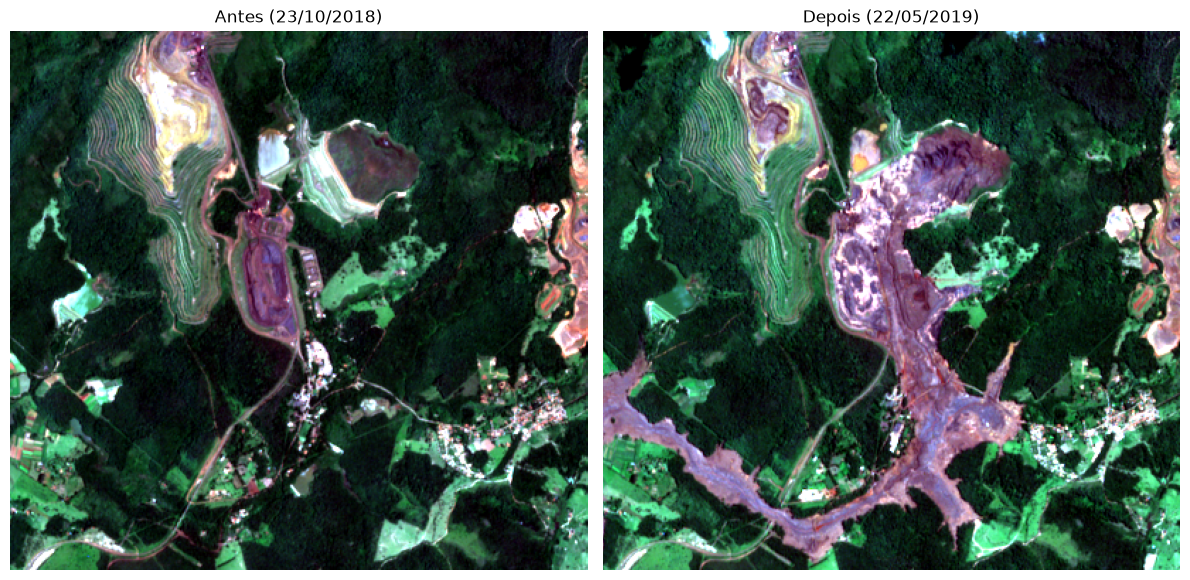
### Criando uma composicao falsa cor
# aqui normalizando por percentil mas poderia ser normalizado por min/max

rgb_antes = make_rgb(nir_antes, green_antes, blue_antes)
rgb_depois = make_rgb(nir_depois, green_depois, blue_depois)

fig, (ax1, ax2) = plt.subplots(1, 2, figsize=(12, 6))
ax1.imshow(rgb_antes)
ax1.set_title("Antes (23/10/2018)")
ax1.axis("off")
ax2.imshow(rgb_depois)
ax2.set_title("Depois (22/05/2019)")
ax2.axis("off")
plt.tight_layout()
plt.show()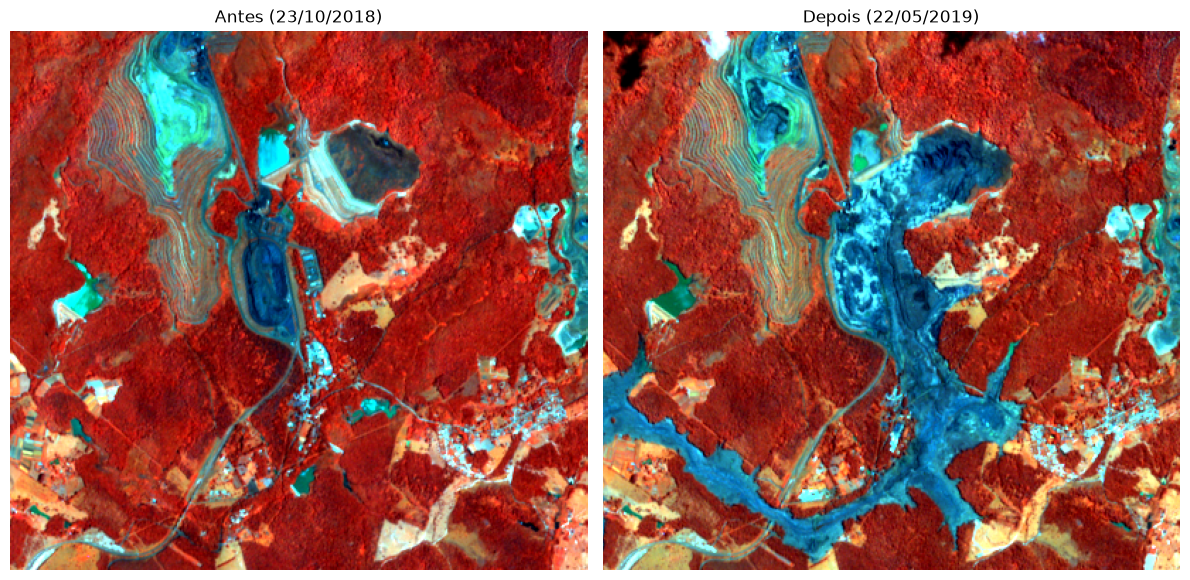
Agora vamos calcular três índices amplamente usados em sensoriamento remoto:
Alem disso, vamos tentar utilizar um indice espectral para realçar a quantidade de material particulado presente na agua ou solo exposto, para isso, utilizando o catálogo de indices espectrais presente em: Awesome Spectral Indices
Vamos prosseguir com os índices - **** - ****
def calc_ndvi(nir, red):
    """NDVI = (NIR - RED) / (NIR + RED)"""
    with np.errstate(divide="ignore", invalid="ignore"):
        return (nir - red) / (nir + red)


def calc_ndwi(green, nir):
    """NDWI (McFeeters) = (GREEN - NIR) / (GREEN + NIR)"""
    with np.errstate(divide="ignore", invalid="ignore"):
        return (green - nir) / (green + nir)


def calc_evi(nir, red, blue, G=2.5, C1=6, C2=7.5, L=1):
    """EVI = G * (NIR - RED) / (NIR + C1*RED - C2*BLUE + L)"""
    with np.errstate(divide="ignore", invalid="ignore"):
        return G * (nir - red) / (nir + C1 * red - C2 * blue + L)


def calc_soil_index(B, G, R, N, S1, S2):
    "Normalized Shortwave Infrared Difference Soil-Moisture"
    with np.errstate(divide="ignore",invalid="ignore"):
return (S1 - S2)/(S1 + S2)ndvi_antes = calc_ndvi(nir_antes, red_antes)
ndvi_depois = calc_ndvi(nir_depois, red_depois)
ndwi_antes = calc_ndwi(green_antes, nir_antes)
ndwi_depois = calc_ndwi(green_depois, nir_depois)
evi_antes = calc_evi(nir_antes, red_antes, blue_antes)
evi_depois = calc_evi(nir_depois, red_depois, blue_depois)
## soil index
## quando calculamos a banda SWIR1 temos um problema, já que sua resolução é 20 metros e a resolucao de R,G,B,N é 10 metros.
## Portanto, ou resampleamos com numpy todas as bandas para 20 metros, ou pegamos direto do STAC as bandas já em 20 metros.
## Irei pegar direto do STAC
## a banda de NIR vou resamplear na mao usando o scikit-image
import skimage as ski
nir_antes_20 = ski.transform.resize(nir_antes,(swir1_antes_20.shape))
nir_depois_20 = ski.transform.resize(nir_depois,(swir1_depois_20.shape))
soil_antes = calc_soil_index(blue_antes_20,green_antes_20,red_antes_20, nir_antes_20, swir1_antes_20, swir2_antes_20)
soil_depois = calc_soil_index(blue_depois_20, green_depois_20, red_depois_20, nir_depois_20, swir1_depois_20, swir2_depois_20)
check_memory("depois de calcular os índices")[RAM] depois de calcular os índices: 14.65 GB usados de 32.00 GB (56.1%) | disponível: 14.04 GBfig, axes = plt.subplots(4, 2, figsize=(10, 14))
for ax, data, title in zip(axes[0], [ndvi_antes, ndvi_depois], ["NDVI - Antes", "NDVI - Depois"]):
im = ax.imshow(data, cmap="RdYlGn", vmin=-1, vmax=1)
ax.set_title(title)
ax.axis("off")
fig.colorbar(im, ax=ax, fraction=0.046)
for ax, data, title in zip(axes[1], [ndwi_antes, ndwi_depois], ["NDWI - Antes", "NDWI - Depois"]):
im = ax.imshow(data, cmap="Blues", vmin=-1, vmax=1)
ax.set_title(title)
ax.axis("off")
fig.colorbar(im, ax=ax, fraction=0.046)
for ax, data, title in zip(axes[2], [evi_antes, evi_depois], ["EVI - Antes", "EVI - Depois"]):
im = ax.imshow(data, cmap="RdYlGn", vmin=-1, vmax=1)
ax.set_title(title)
ax.axis("off")
fig.colorbar(im, ax=ax, fraction=0.046)
for ax, data, title in zip(axes[3], [soil_antes, soil_depois], ["Soil - Antes", "Soil - Depois"]):
im = ax.imshow(data, cmap="RdYlGn", vmin=-1, vmax=1)
ax.set_title(title)
ax.axis("off")
fig.colorbar(im, ax=ax, fraction=0.046)
plt.tight_layout()
plt.show()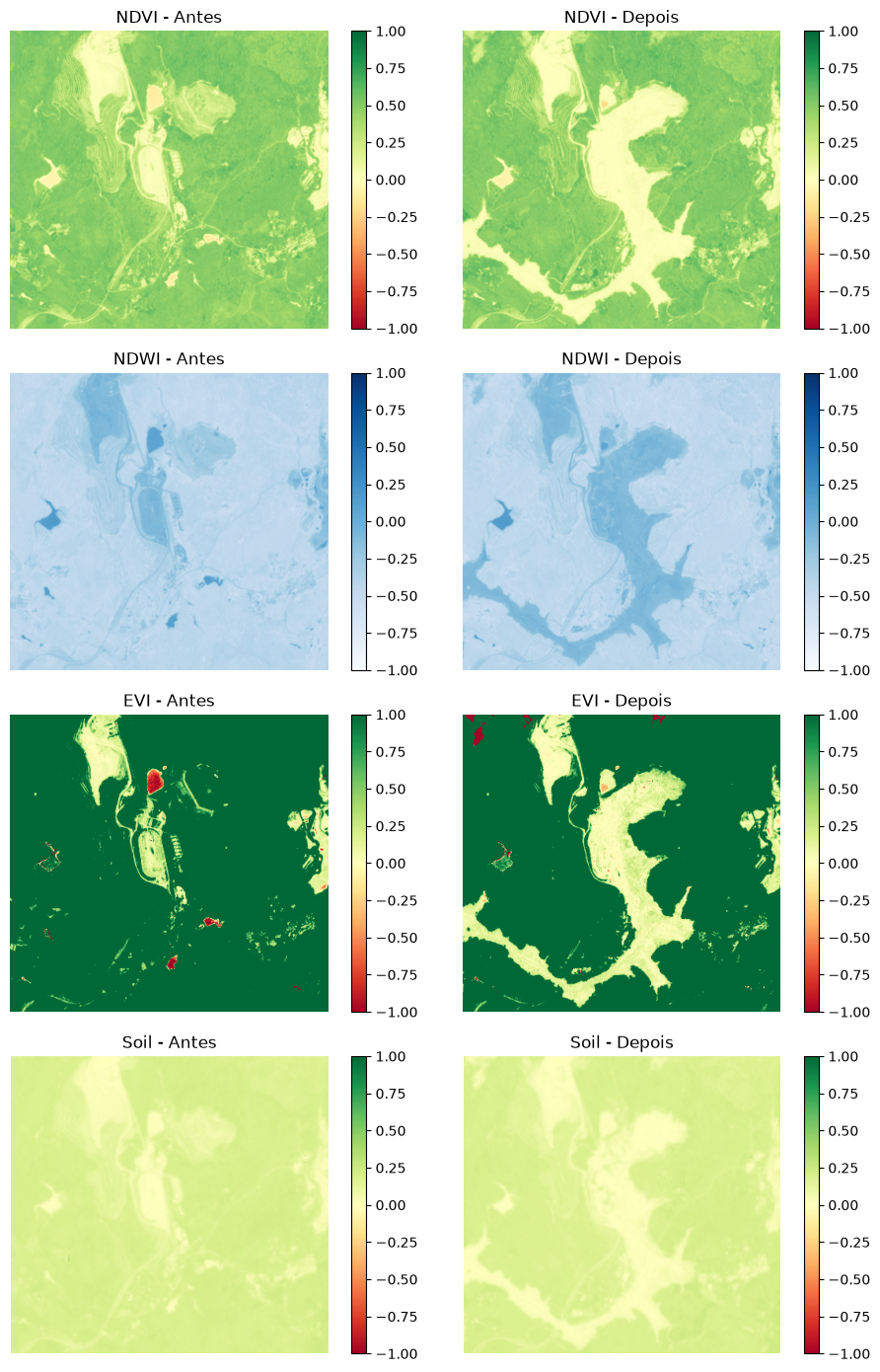
O histograma mostra como os valores do índice estão distribuídos na imagem. Vamos olhar o NDVI de antes do rompimento.
ndvi_flat = np.ma.filled(ndvi_antes, np.nan).ravel()
ndvi_flat = ndvi_flat[np.isfinite(ndvi_flat)]

plt.figure(figsize=(8, 4))
sns.histplot(ndvi_flat, kde=True,
             color="seagreen",
             binrange=(-1, 1),
             bins=50
             )
plt.axvline(0.2, color="orange", linestyle="--", label="limiar 0.2")
plt.axvline(0.45, color="darkgreen", linestyle="--", label="limiar 0.45")
plt.title("Distribuição dos valores de NDVI (antes do rompimento)")
plt.xlabel("NDVI")
plt.legend()
plt.show()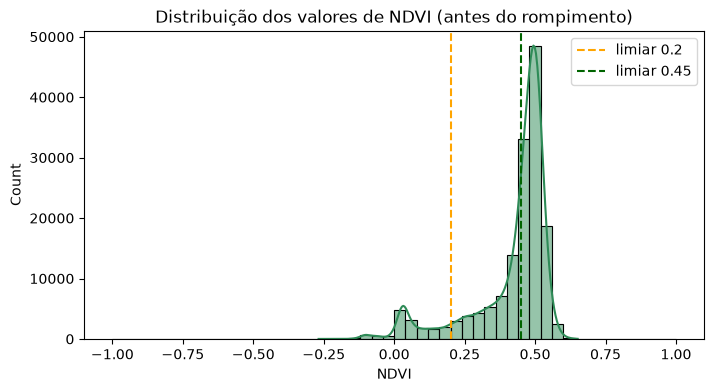
evi_normalizedarray([0.87793689, 0.87822718, 0.87827761, ..., 0.87648972, 0.87642845,
0.87650834], shape=(155447,))evi_flat = np.ma.filled(evi_antes, np.nan).ravel()
evi_flat = evi_flat[np.isfinite(evi_flat)]
evi_normalized = (evi_flat - evi_flat.min()) / (evi_flat.max() - evi_flat.min())
plt.figure(figsize=(8, 4))
sns.histplot(evi_normalized,
kde=True,
color="seagreen",
binrange=(0, 1),
bins=50)
plt.axvline(0.2, color="orange", linestyle="--", label="limiar 0.2")
plt.axvline(0.45, color="darkgreen", linestyle="--", label="limiar 0.45")
plt.title("Distribuição dos valores de EVI (antes do rompimento)")
plt.xlabel("EVI")
plt.legend()
plt.show()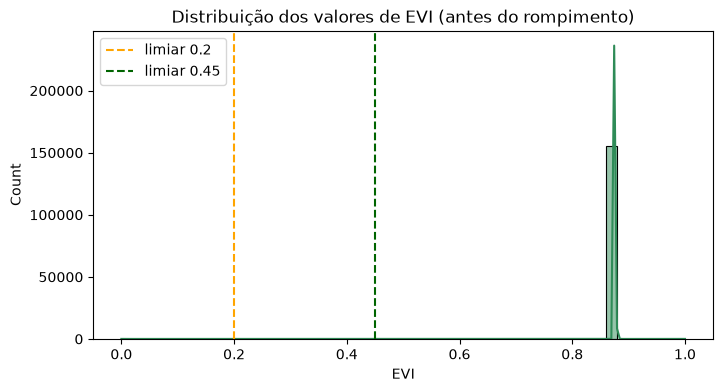
Com base no histograma, podemos definir limiares para classificar a imagem em classes. Para o NDVI:
< 0.2: solo exposto / água / área urbana0.2 – 0.45: vegetação esparsa/fraca>= 0.45: vegetação vigorosadef classify_ndvi(ndvi):
"""0 = sem dado, 1 = solo/água/urbano, 2 = vegetação fraca, 3 = vegetação vigorosa"""
ndvi_filled = np.ma.filled(ndvi, np.nan)
classes = np.zeros_like(ndvi_filled, dtype=np.int8)
classes[ndvi_filled < 0.2] = 1
classes[(ndvi_filled >= 0.2) & (ndvi_filled < 0.45)] = 2
classes[ndvi_filled >= 0.45] = 3
return classes
classes_antes = classify_ndvi(ndvi_antes)
classes_depois = classify_ndvi(ndvi_depois)
cmap = ListedColormap(["black", "#d9b38c", "#a8d08d", "#1a7a1a"])
fig, (ax1, ax2) = plt.subplots(1, 2, figsize=(12, 6))
ax1.imshow(classes_antes, cmap=cmap, vmin=0, vmax=3)
ax1.set_title("Classes NDVI - Antes")
ax1.axis("off")
ax2.imshow(classes_depois, cmap=cmap, vmin=0, vmax=3)
ax2.set_title("Classes NDVI - Depois")
ax2.axis("off")
plt.tight_layout()
plt.show()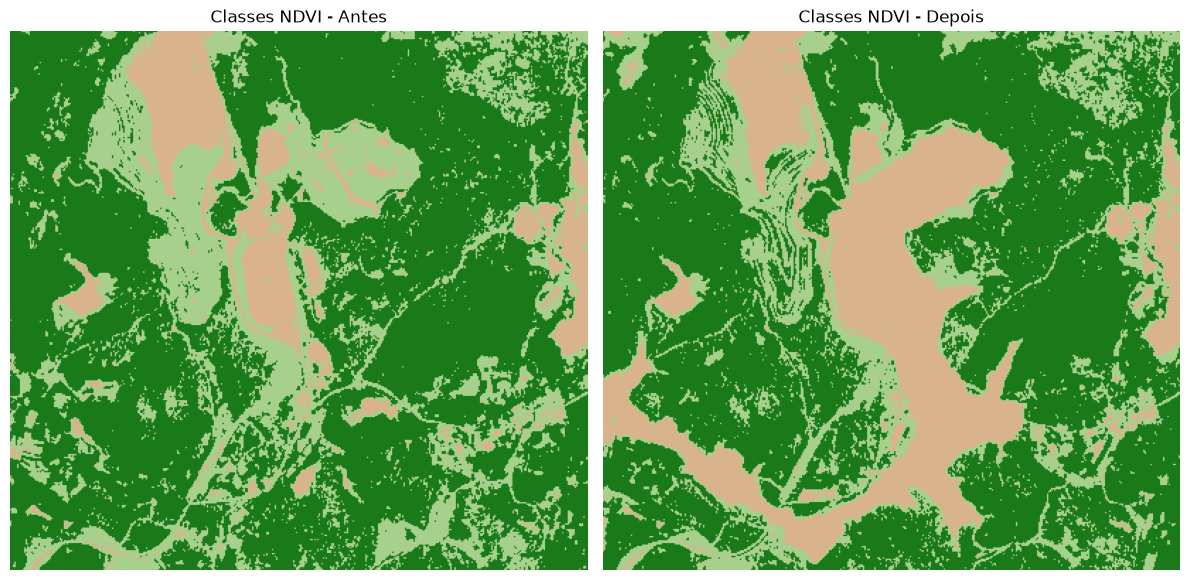
def classify_evi(evi):
    """0 = sem dado,
    1 = solo/água/urbano,
    2 = vegetação"""
    evi_filled = np.ma.filled(evi, np.nan)
    classes = np.zeros_like(evi_filled, dtype=np.int8)
    classes[evi_filled < 0.75] = 1
    classes[(evi_filled >= 0.75)] = 2
    return classes


classes_antes = classify_ndvi(evi_antes)
classes_depois = classify_ndvi(evi_depois)

cmap = ListedColormap(["black", "#d9b38c", "#a8d08d", "#1a7a1a"])

fig, (ax1, ax2) = plt.subplots(1, 2, figsize=(12, 6))
ax1.imshow(classes_antes, cmap=cmap, vmin=0, vmax=3)
ax1.set_title("Classes EVI - Antes")
ax1.axis("off")
ax2.imshow(classes_depois, cmap=cmap, vmin=0, vmax=3)
ax2.set_title("Classes EVI - Depois")
ax2.axis("off")
plt.tight_layout()
plt.show()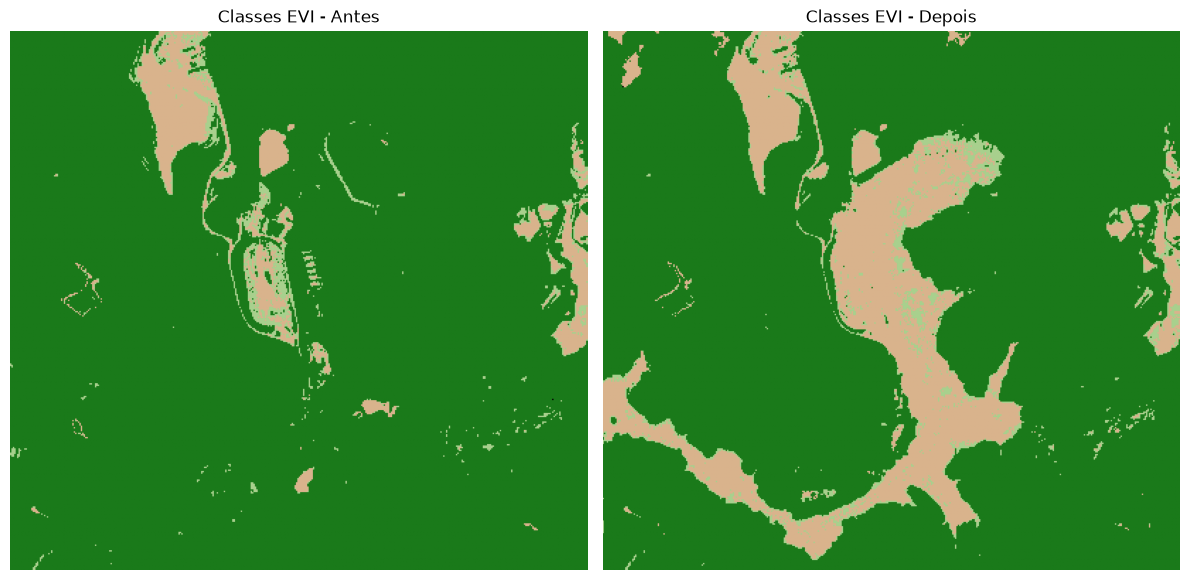
# FAÇA AQUI A CLASSIFICAO DO NDWI Agora vamos para uma parte importante, vamos avaliar a diferença entre uma image e outra. Note que essa diferença é feita pixel-to-pixel, onde cada entrada de um pixel é analisada especificamente referente ao pixel da outra imagem na mesma posição. Isso requer que os rasteres estejam alinhandos, projetados no mesmo CRS e possuam o mesmo np.shape.
Subtraindo o NDVI de depois pelo de antes, conseguimos visualizar exatamente onde a vegetação foi destruída pela onda de rejeitos. Valores bem negativos (azul) indicam perda de vegetação/solo coberto pela lama.
ndvi_diff = np.ma.filled(ndvi_depois, np.nan) - np.ma.filled(ndvi_antes, np.nan)

plt.figure(figsize=(8, 6))
im = plt.imshow(ndvi_diff, cmap="RdBu", vmin=-1, vmax=1)
plt.colorbar(im, label="Diferença de NDVI (depois - antes)")
plt.title("Impacto do rompimento da barragem — diferença de NDVI")
plt.axis("off")
plt.show()

print("Diferença média de NDVI:", np.nanmean(ndvi_diff))
print("Pixels com forte perda de vegetação (diff < -0.3):", np.sum(ndvi_diff < -0.3))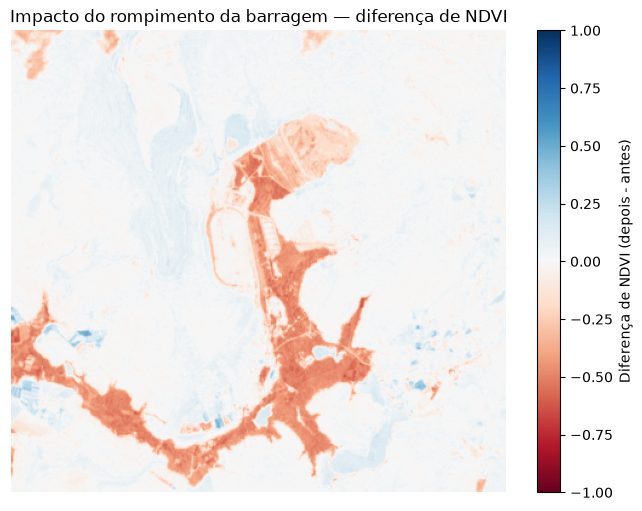
Diferença média de NDVI: -0.037199162
Pixels com forte perda de vegetação (diff < -0.3): 13679
Se eu tenho 13.000 pixels que mudaram a vegetação, e portanto, eu sei o tamanho de cada pixel, isso significa que eu posso estimar a área afetada.
# Aqui eu considero que toda a mudança na image que foi maior que 0.3 foi portanto perda de vegetação em função do rompimento da barragem
total_pixels_alterados = np.sum(ndvi_diff < -0.3)

# sabendo que cada pixel tem a resolução de 10m
area_m2 = total_pixels_alterados*10*10
area_km2 = area_m2 / 1e6

print(f"Area afetada em m2: {area_m2}")
print(f"Area afetada em km2:{area_km2}")
Area afetada em m2: 1367900
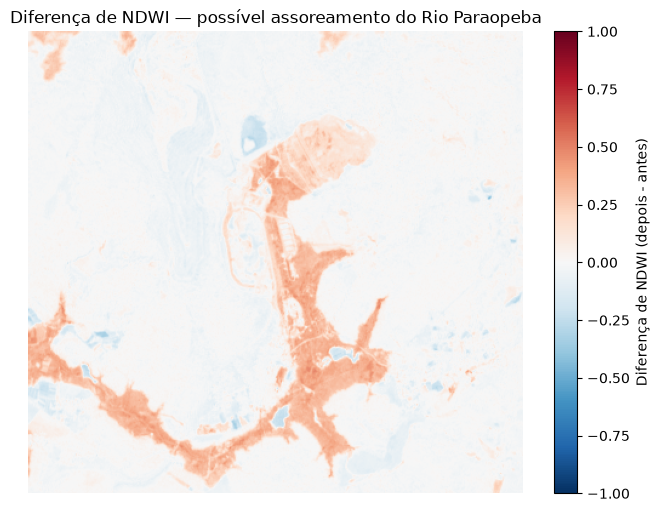
Area afetada em km2:1.3679O rejeito de mineração se comporta de forma parecida com água/lama nas bandas espectrais. Vamos ver a diferença de NDWI também, que pode evidenciar a lama e o assoreamento do Rio Paraopeba.
ndwi_diff = np.ma.filled(ndwi_depois, np.nan) - np.ma.filled(ndwi_antes, np.nan)

plt.figure(figsize=(8, 6))
im = plt.imshow(ndwi_diff, cmap="RdBu_r", vmin=-1, vmax=1)
plt.colorbar(im, label="Diferença de NDWI (depois - antes)")
plt.title("Diferença de NDWI — possível assoreamento do Rio Paraopeba")
plt.axis("off")
plt.show()
[RAM] fim do notebook: 15.29 GB usados de 32.00 GB (58.1%) | disponível: 13.41 GB